
Creating engaging Instagram and Facebook reels can be difficult, especially when it comes to timing your photo transitions to match the beats of your chosen music. Fortunately, Python provides a great answer to this problem. In this blog article, we’ll look at how to utilize the librosa package for automatic beats detection in audio files and discover the optimal times to change photographs in your reels. This method not only saves time but also adds professionalism to your social media posts.
#What Are Instagram and Facebook Reels?
- Instagram Reels: Instagram introduced Reels as a way to compete with TikTok. Reels allow users to create 15 to 60-second multi-clip videos with audio, effects, and new creative tools. These short videos can be shared on your feed, in stories, or on the Reels Explore page, where they can reach a wider audience.
- Facebook Reels: Following Instagram’s success, Facebook launched Reels to allow users to create and share short, engaging videos on their platform. Similar to Instagram Reels, these videos can be enhanced with music, effects, and various editing tools.
#Why Are Reels Important?
- Engagement: Short form videos are extremely interesting. They instantly attract viewers’ attention and keep them entertained, making them ideal for today’s fast-paced social media landscape.
- Creativity: Reels provide you a platform to express your creativity. Whether you enjoy dance, humor, fashion, or simply sharing moments from your life, Reels provide a fun way to express yourself.
- Reach: Reels have the ability to reach a larger audience. Both Instagram and Facebook promote Reels in their algorithms, so your work is more likely to be spotted by people who do not follow you.
- Trend Participation: Reels are frequently influenced by trends. Participating in these trends allows you to acquire attention and contribute to the wider debate on social media.
#Why Timing Matters
#Prerequisites
- Python 3.6 or higher
librosalibrary for audio processingmatplotliblibrary for visualization
pip install librosa matplotlib
Also, you need your an audio file to be processed. So, where to find free audio files or music?
I downloaded some free audio samples from http://dig.ccmixter.org/ and https://incompetech.com.
#The Code
import librosa
import matplotlib.pyplot as plt
import sys

def analyze_beats(audio_path):
    # Load the audio file
    y, sr = librosa.load(audio_path)

    # Analyze the tempo and beats
    tempo, beats = librosa.beat.beat_track(y=y, sr=sr)

    # Convert beat frames to time instants
    beat_times = librosa.frames_to_time(beats, sr=sr)

    # Print the beat times
    print("Best instants to change the photo (in seconds):")
    for time in beat_times:
        print(time)

    # Plot the waveform and beat times
    plt.figure(figsize=(14, 5))
    librosa.display.waveshow(y, sr=sr)
    plt.vlines(beat_times, -1, 1, color='r', alpha=0.75, linestyle='--', label='Beats')
    plt.xlabel('Time (s)')
    plt.ylabel('Amplitude')
    plt.title('Audio waveform with beat times')
    plt.legend()
    plt.show()

if __name__ == "__main__":
    if len(sys.argv) != 2:
        print("Usage: python analyze_beats.py <path_to_audio_file>")
    else:
        audio_path = sys.argv[1]
        analyze_beats(audio_path)
#How It Works
- Loading the Audio File:
y, sr = librosa.load(audio_path)
The librosa.load function loads the audio file specified by audio_path. It returns the audio time series y and the sampling rate sr.
- Analyzing Tempo and Beats:
tempo, beats = librosa.beat.beat_track(y=y, sr=sr)
The librosa.beat.beat_track function analyzes the audio and identifies the beats. It returns the estimated tempo and the frame indices of the detected beats.
- Converting Beat Frames to Time Instants:
beat_times = librosa.frames_to_time(beats, sr=sr)
The librosa.frames_to_time function converts the frame indices of the beats to time instants in seconds.
- Printing Beat Times:
   for time in beat_times:
       print(time)
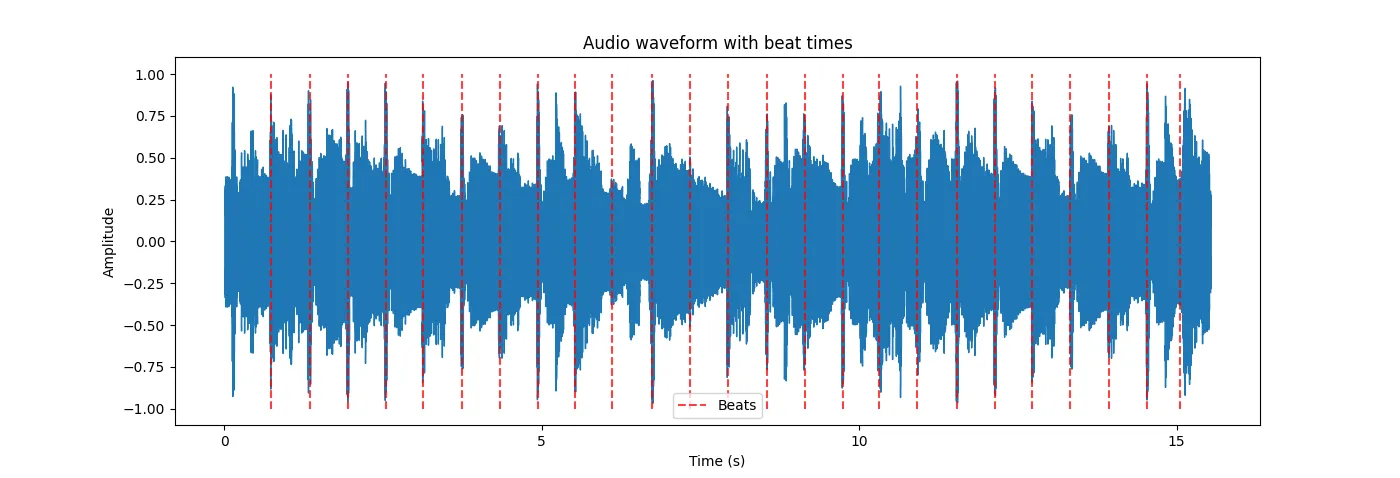
- Visualizing the Beat Times:
   plt.figure(figsize=(14, 5))
   librosa.display.waveshow(y, sr=sr)
   plt.vlines(beat_times, -1, 1, color='r', alpha=0.75, linestyle='--', label='Beats')
   plt.xlabel('Time (s)')
   plt.ylabel('Amplitude')
   plt.title('Audio waveform with beat times')
   plt.legend()
   plt.show()
#Running the Script
To use the script, save it as analyze_beats.py and run it from the command line with the path to your audio file:
python analyze_beats.py <path_to_audio_file>
python analyze_beats.py your_song.mp3
#An example
Best instants to change the photo (in seconds):
0.7430385487528345
1.3467573696145125
1.9504761904761905
2.5541950113378684
3.1346938775510202
3.7384126984126986
4.342131519274377
4.9458503401360545
5.526349206349207
6.106848072562358
6.733786848072563
7.337505668934241
7.9412244897959186
8.544943310657596
9.148662131519274
9.752380952380953
10.309659863945578
10.913378684807256
11.54031746031746
12.144036281179138
12.72453514739229
13.328253968253968
13.931972789115646
14.535691609977324
15.046530612244897
#Practical Application
- Choose Your Music: Select an audio track that fits the mood and theme of your reel.
- Run the Script: Use the Python script to analyze the beats in your chosen music.
- Note the Beat Times: Write down or copy the beat times printed by the script.
- Edit Your Reel: Import your photos and music into a video editing software like Adobe Premiere Pro, Final Cut Pro, or even free tools like DaVinci Resolve. Align your photo transitions with the beat times for a seamless and engaging reel.
#Conclusion
By using Python and the librosa library, you can automate the process of identifying the best time instants for photo transitions in your Instagram and Facebook reels. This not only saves time but also enhances the quality of your content, making your reels more engaging and professional. Give it a try and see how this technique transforms your social media presence!